
Restaurants · Cafes · Clubs
Built for Restaurants. Cafés. Clubs. Made Simple.
One platform to manage your entire business.
- POS
- KOT
- Billing
- Orders
- Reports
We will call you within one working day. Or call +91 99255 47955
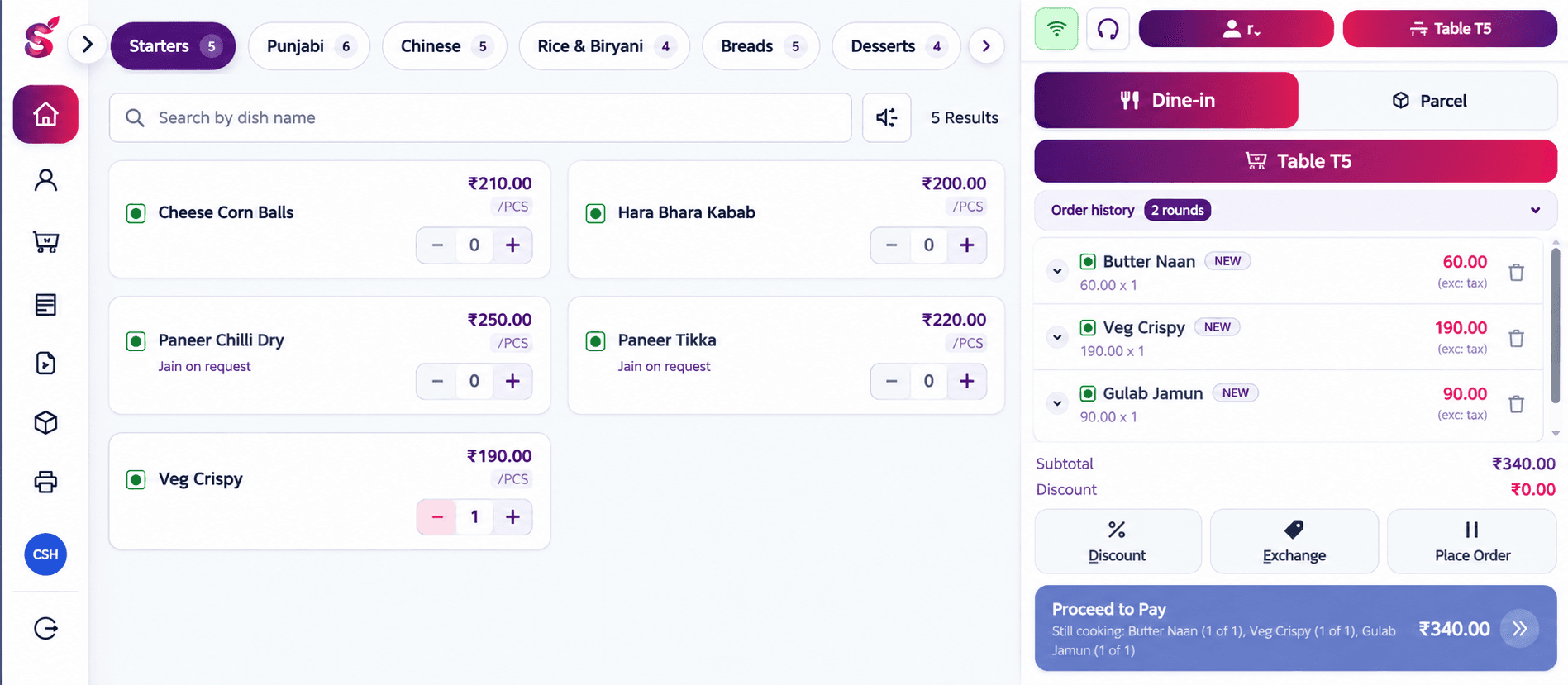
Captain takes the order at the table 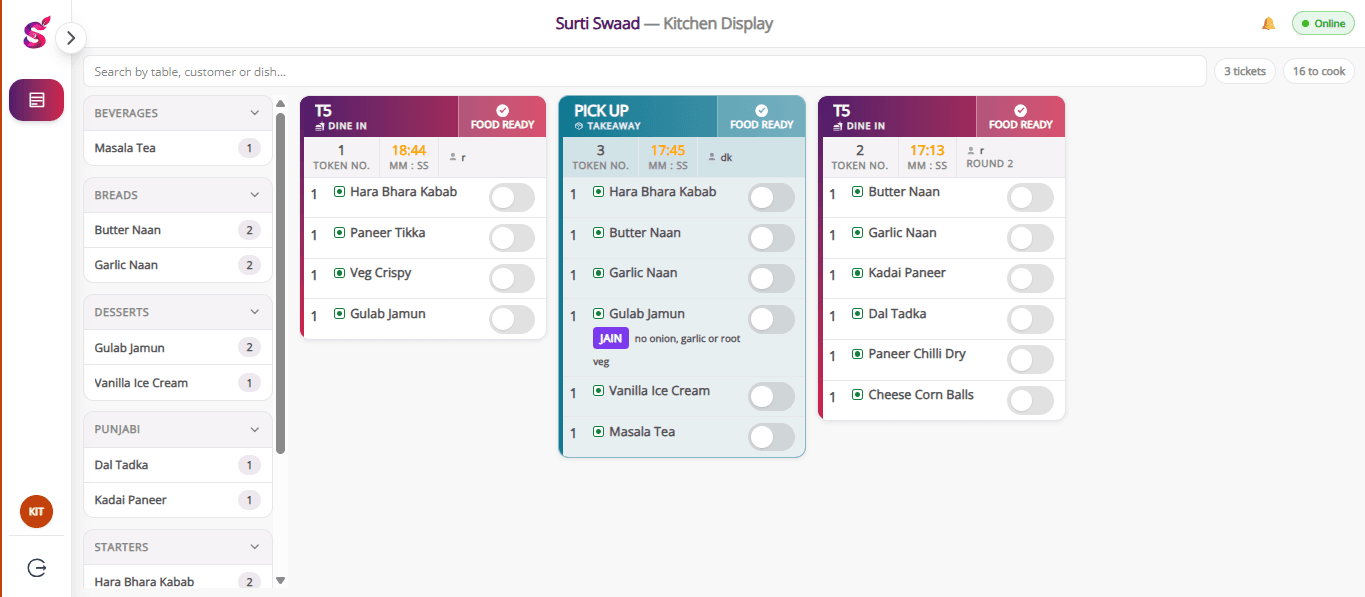
Kitchen sees it the moment it is sent 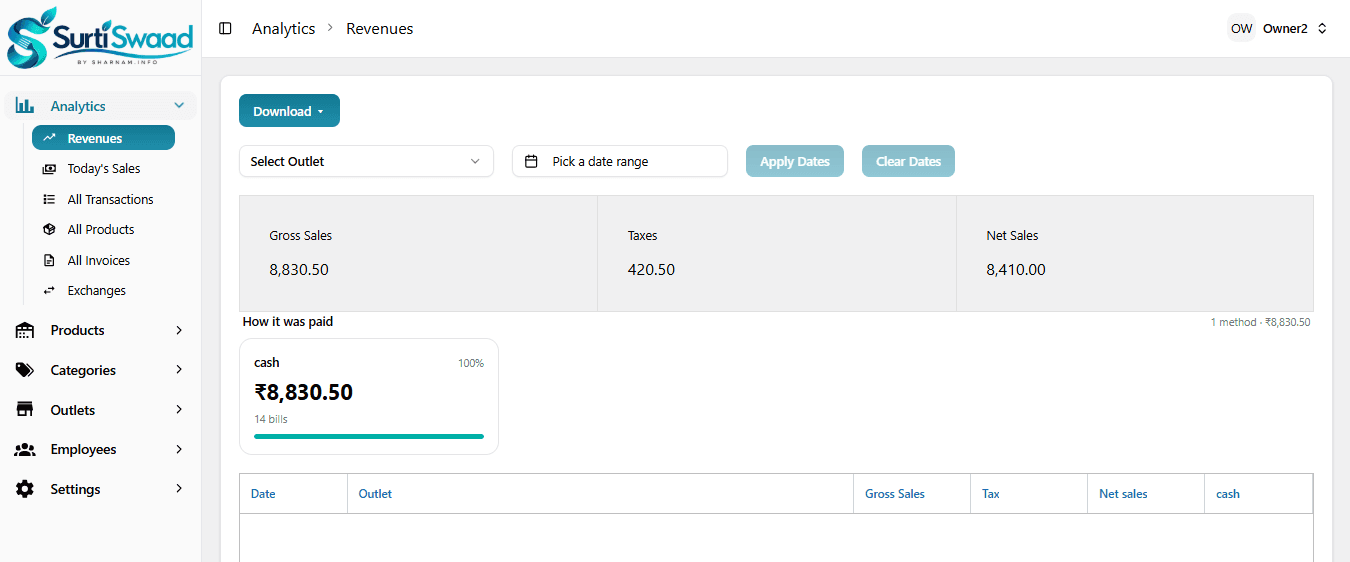
You read the day from anywhere
Screens from the product, captured on a demo outlet.
Why owners call us
Four things that go wrong without a proper till.
None of these are unusual. They happen in a busy kitchen every week, and they all cost money.
The same table gets billed twice
Two people take orders on table 4. Neither knows the other did. One bill gets settled, the other gets argued about at the door.
An order never reaches the kitchen
A slip goes missing between the floor and the tawa. The guest waits forty minutes. You find out when they are already angry.
Nobody can add up the day
Cash in the drawer, UPI across three phones, a notebook with half the entries. Closing takes an hour and the number still does not match.
A discount nobody approved
A bill gets reduced after the food has gone out. You see the total at the end of the month. You never see what happened.
How an order moves
One order, four screens, no paper.
The same order travels from the table to your reports without anyone writing it down twice.
Captainon a tablet, at the table
The order is taken at the table
The captain opens table 4, taps the dishes, and marks one of them Jain. The table turns occupied on every other screen at that moment, so nobody seats a second party there.
Chefon the kitchen screen
The kitchen sees it immediately
The order arrives as a numbered kitchen ticket. When the table orders more, it comes through as the next round, so the kitchen always knows what is new and what it has already cooked.
Cashieron the counter
The bill is settled at the counter
CGST and SGST are split automatically. The guest pays part cash, part UPI. The bill prints straight to the thermal printer — no print dialog, and the paper cuts itself.
Table 4 · Bill
- 2Surti Locho160
- 1Khaman (Jain)90
- 1Paneer Tikka240
- 4Masala Chaas120
- Subtotal
- ₹610.00
- CGST 2.5%
- ₹15.25
- SGST 2.5%
- ₹15.25
- Total
- ₹640.50
Payment
Split across two methods. Change calculated for you.
Prints straight to the thermal printer
Owneranywhere
You read the day from your phone
Revenue, every transaction, every invoice, and which dishes actually sold. Day-wise cash and UPI, per outlet, without asking anyone.
What it does
Built around how a busy place actually runs.
01
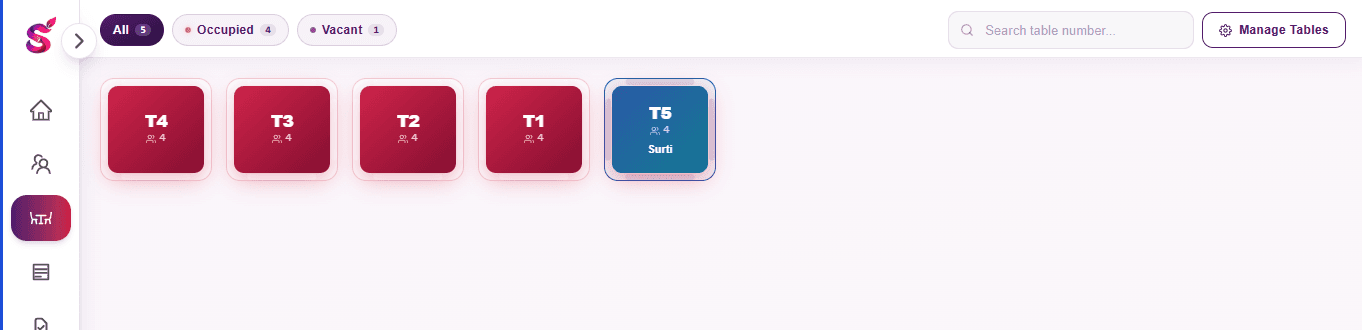
On the floor
A live floor plan, so two people never take the same table by accident.
- Floor plan with tables that update live on every screen
- Menu by category, with dish photos, search and favourites
- Veg, non-veg and egg marks on every dish
- Jain where the kitchen can cook it without onion, garlic or root vegetables
- Regular customers found by name or number as the cashier types
- Hold an order, or send a bill request from the floor to the counter
02
In the kitchen
Orders arrive as numbered rounds, so nothing gets cooked twice or not at all.
- Kitchen tickets sent as the table orders more, numbered by round
- The Jain mark travels with the line to the ticket and onto the bill
- A bill cannot be made before the kitchen has the order
03
At the counter
Settle any bill, any way it gets paid, and print it properly.
- Split payments across cash, UPI and card, with change calculated
- Discounts that need the owner's approval before they apply
- Exchanges and refunds against a settled bill
- Parcel and counter sales, paid before the food is made
- CGST and SGST split on the bill, with the outlet's GSTIN
- One account, one device — signing in elsewhere signs the other out
Table 4 · Bill
- 2Surti Locho160
- 1Khaman (Jain)90
- 1Paneer Tikka240
- 4Masala Chaas120
- Subtotal
- ₹610.00
- CGST 2.5%
- ₹15.25
- SGST 2.5%
- ₹15.25
- Total
- ₹640.50
Payment
Split across two methods. Change calculated for you.
Prints straight to the thermal printer
04
In the office, for the owner
Set the place up once, then read the money.
- Outlets, each with its own name, address, GSTIN and bill footer
- Employees and their roles — owner, cashier, captain, chef
- Menu: categories, dishes, prices, tax rate, and which outlets sell what
- Promotions and payment methods, set per outlet
- Reports: revenue, transactions, invoices, product-wise sales, petty expenses
- Day-wise cash and UPI totals
Printing
The bill prints. That is the whole feature.
Surti Swaad talks to the thermal printer in its own language. No print dialog, no browser margins, no half-cut paper. It works on 58mm and 80mm rolls, and the paper cuts itself when the bill is done.
- No print dialog
- Press settle. The bill comes out.
- 58mm and 80mm
- Whichever roll the printer already takes.
- Cuts automatically
- The cashier tears nothing.
- GST on every bill
- CGST and SGST split, with the outlet's GSTIN printed.
SURTI SWAAD DEMO
Surat, Gujarat
GSTIN: 24XXXXXXXXXXXZX
| 2 | Surti Locho | 160.00 |
| 1 | Khaman (Jain) | 90.00 |
| 1 | Paneer Tikka | 240.00 |
| 4 | Masala Chaas | 120.00 |
Thank you, come again
Pricing
Three months free. Then pick a plan.
Start with every feature switched on for three months. After that it is Silver or Gold, billed once a year.
- 3 months free
Free Demo
Run the whole product in your own kitchen before you pay anything.
Freefor 3 months
No card, no commitment
- Every feature switched on
- Three months, no charge
- Move to Silver or Gold when it ends
- Annual plan
Silver
Counter and takeaway billing, with the reports to match.
₹9,999/ year
Plus GST
- Billing, takeaway and token orders
- Menu management
- Basic reports and order management
- Annual plan
Gold
Full service — dine-in, kitchen tickets and the captain app.
₹10,999/ year
Plus GST
- Everything in Silver
- Dine-in, KOT and kitchen management
- Captain app and customer management
- Advanced reports and analytics
All prices are exclusive of GST.
Add-on
More captains, whenever you need them.
Your plan comes with the captain app. Every extra captain who signs in costs:
₹50
per captain, per month
₹499
per captain, per year
Saves ₹101
Available on any plan that includes the captain app — Free Demo and Gold.
Add one mid-season and remove them when the season ends. Exclusive of GST.
See it on your own menu.
A demo takes about twenty minutes. We will set up a few of your own dishes and let you take an order on it yourself.
- We call you within one working day
- About twenty minutes, on the phone or at your counter
- You take an order on it yourself
- No obligation, and we will quote you on the call
Would rather just talk to someone?
+91 99255 47955